Tank Combat
Tank Combat is a two-player tank duel over the local network, built in Unreal Engine as a modern take on Atari's Combat (1977). One player hosts, the other finds the game from the main menu, and the two fight across a top-down arena with three bullet types and a speed-boost pickup. Underneath, firing and power-ups run on the Gameplay Ability System, bullets come from a server-side object pool, and the host decides every outcome and replicates it to the client.
Game Overview
LAN Sessions
One player hosts from the main menu; the other searches the local network and joins from a session list that shows each host's ping.
Server-Authoritative Play
The host decides movement, hits and scoring. The client sends its input and draws whatever the server replicates back.
Three Bullet Types
Standard, Guided and Bouncing bullets, each tied to its own game mode.
Speed Boost
A pickup doubles move and turn speed for five seconds through a timed Gameplay Effect.
Hits & Respawns
A hit scores a point, respawns the enemy tank and freezes both tanks for three seconds before play resumes.
Timed Matches
Matches run against a countdown clock, after which hits stop scoring. Arena and tank colors come from a data-table palette set by the server and replicated through the Game State.
Joining a Game
Sessions run on Unreal's Online Subsystem Null, which handles LAN discovery without a platform backend. The host creates a session from the main menu; the client searches, picks the host from the list and travels straight into the match. A small C++ function-library helper reads each result's ping for the list.
Architecture at a Glance
C++ holds the pieces Unreal only exposes to native code, such as the world subsystem and the replicated attribute set, plus the shared math. Blueprint composes them into the game's rules.
C++
Engine-level systemsUTankCombatObjectPool
World subsystem that pre-spawns and recycles bullets. Server-only.
IPoolable
Interface every pooled actor implements: ActivateFromPool / DeactivateToPool.
UTankAbilityAttributeSet
Replicated MoveSpeed and RotationSpeed attributes.
ATankCombatPawn
Collision root and movement component; forwards attribute changes to Blueprint.
ATankCombatBullet
Replicated, always-relevant bullet base with the wall-reflection math.
GetSessionPing
Function-library helper that reads a LAN session's ping for the server list.
Blueprint
Game rulesBP_TankCombatPawn
Input, server-authoritative movement, firing and the post-hit freeze.
BP_TankCombatBullet (+ Guided, Bouncing)
Bullet lifecycle and replicated activation.
GA_FireBullet · GE_BoostSpeed · BP_BoostSpeed
The fire ability, the boost effect and its pickup.
Game Modes: Standard, Guided, Bouncing
Bullet type and pool sizes; player login and spawning.
Game State · Player State
Match state and color palette; replicated score.
Game Instance & Menu
Hosting, finding and joining LAN sessions (Online Subsystem Null).
Networked Multiplayer
The game runs on a listen server: the host's machine is both the server and a player. Every gameplay decision happens there; the client sends input and draws what the server replicates. Two bugs taught me most of what this section is about.
Server-Authoritative Movement
The client never simulates its own tank. Held input goes to the server through a reliable Server Move RPC, which stores it as the tank's current input. On its tick, the server moves each tank from that input and broadcasts the result with a multicast RPC; machines without authority apply the transform directly.
Flow:
- IA_Move → Server Move (client → server)
- Server tick → Handle Movement
- Multicast Update Transform (server → everyone)
- Remote machines set location and rotation
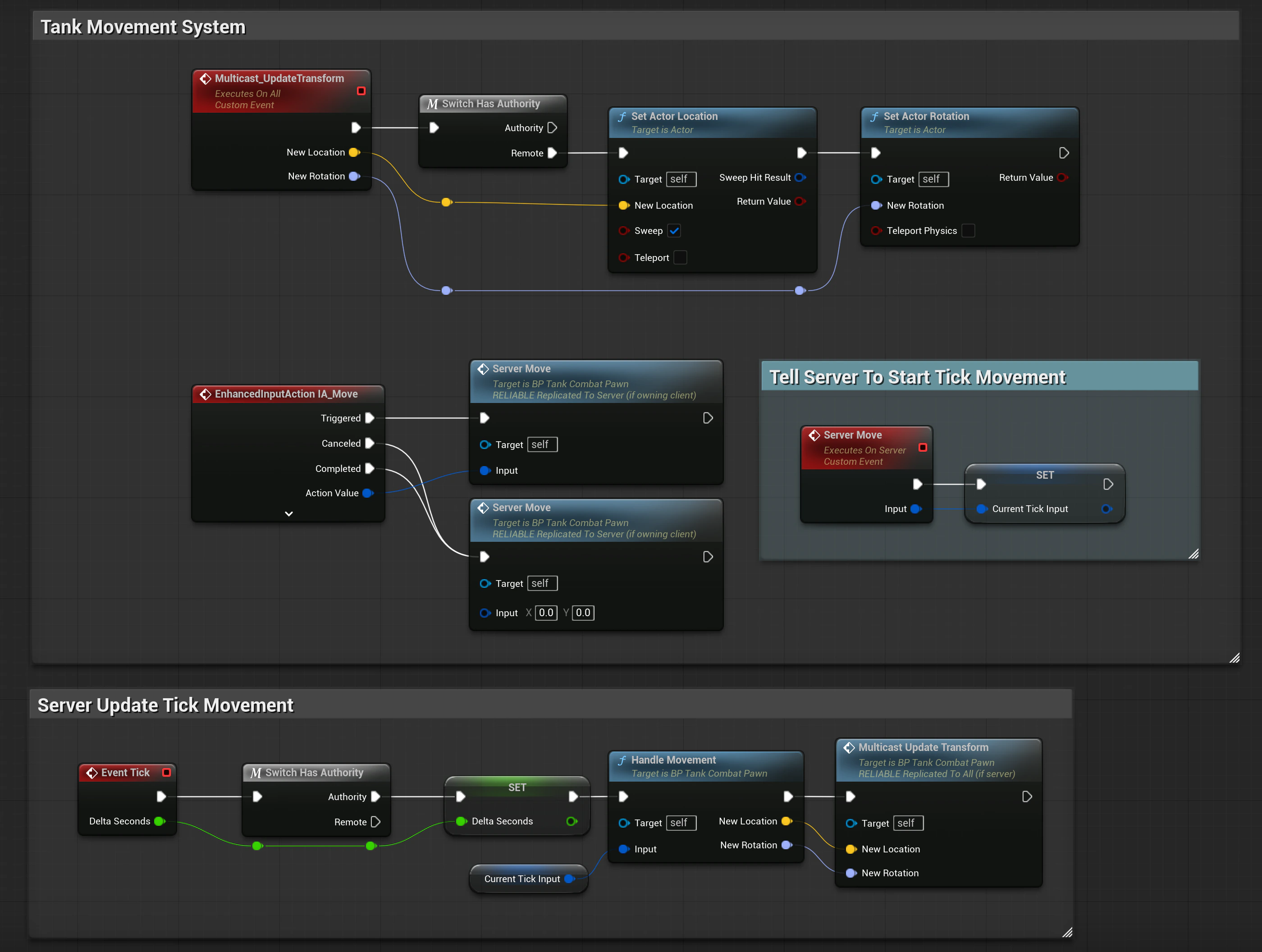
Bug: The Invisible Host Tank
In two-player tests, the client couldn't see the host's tank at all, while the host saw both. The client's own tank was fine, and so were the bullets.
Unreal only replicates an actor to a client while it is relevant to that client, and by default relevancy is a distance check from the client's viewpoint. This game uses a fixed, orthographic top-down camera placed far from the arena, so measured from the client's viewpoint, the host's tank was always beyond the cull distance and never replicated. The client's own tank escaped because an actor is always relevant to its owner; bullets escaped because their C++ constructor already sets bAlwaysRelevant.
The fix was to mark the tank pawn Always Relevant. With two players in one arena, every tank has to reach every client anyway, so distance culling had nothing to save.
ATankCombatBullet::ATankCombatBullet(){ PrimaryActorTick.bCanEverTick = true; bReplicates = true; bAlwaysRelevant = true;}Bug: The Slow Client
Later, with both tanks driving side by side, the client's tank covered about half the ground the host's did, and both screens agreed. It wasn't a display desync; the server really was moving the client's tank less.
The cause was in the server tick: after moving the tanks, it reset the stored input to zero, treating each Server Move as a one-tick impulse. The host's own Server Move runs locally every frame, so the host always had fresh input. The client's RPCs cross the network and don't land exactly one per server tick, so some ticks had nothing new, and those ticks moved the client's tank by zero.
The server now keeps the last input until it's replaced, and releasing the key (Completed or Canceled) sends an explicit zero. Input became state instead of a per-tick event, and both tanks move at the same speed.
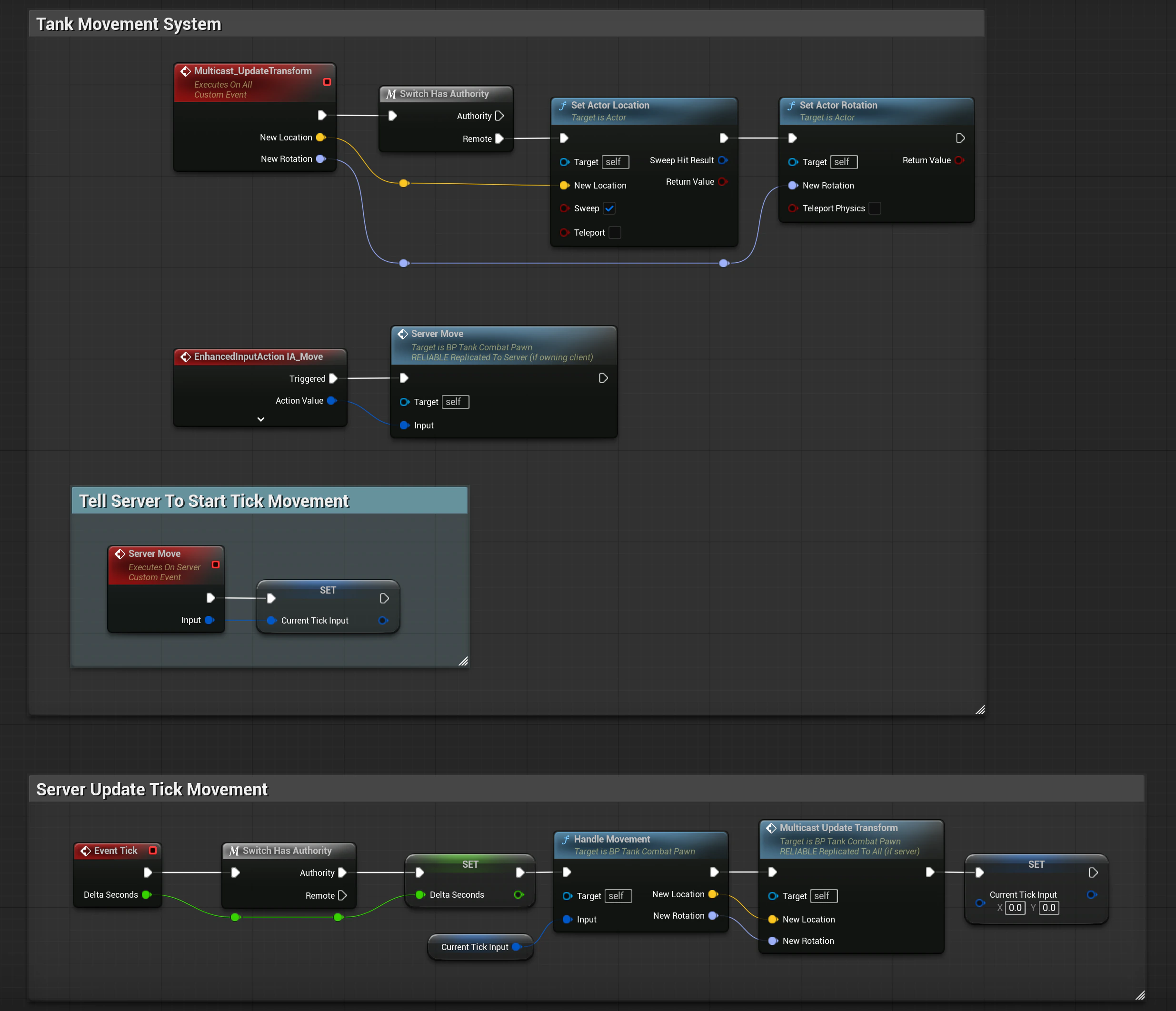
Anatomy of a Shot
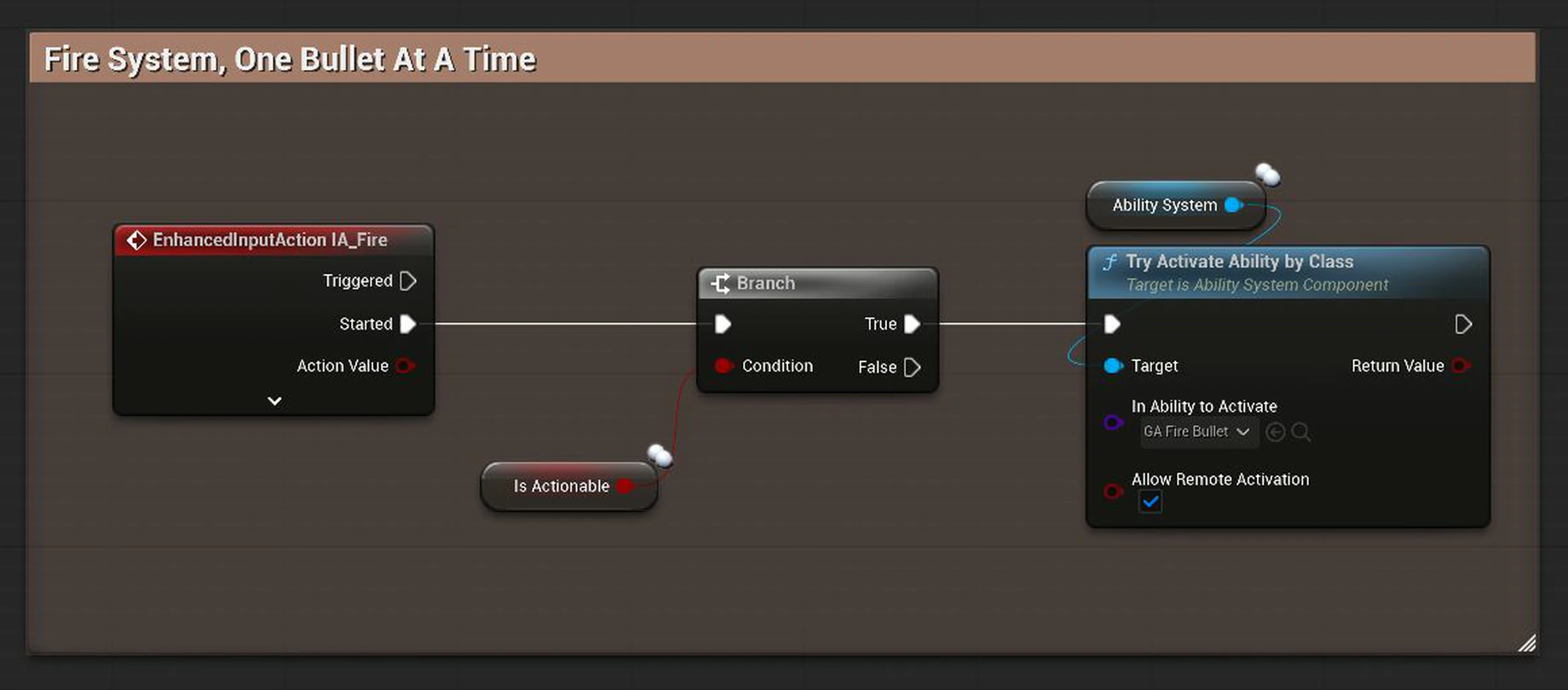
"One bullet at a time" is a single gameplay rule, but enforcing it over the network runs through four systems: input, the Gameplay Ability System, the object pool and replication.
Input
Fire checks Is Actionable, then asks the Ability System Component to activate GA_FireBullet. Remote activation lets a client's request run on the server.
Ability
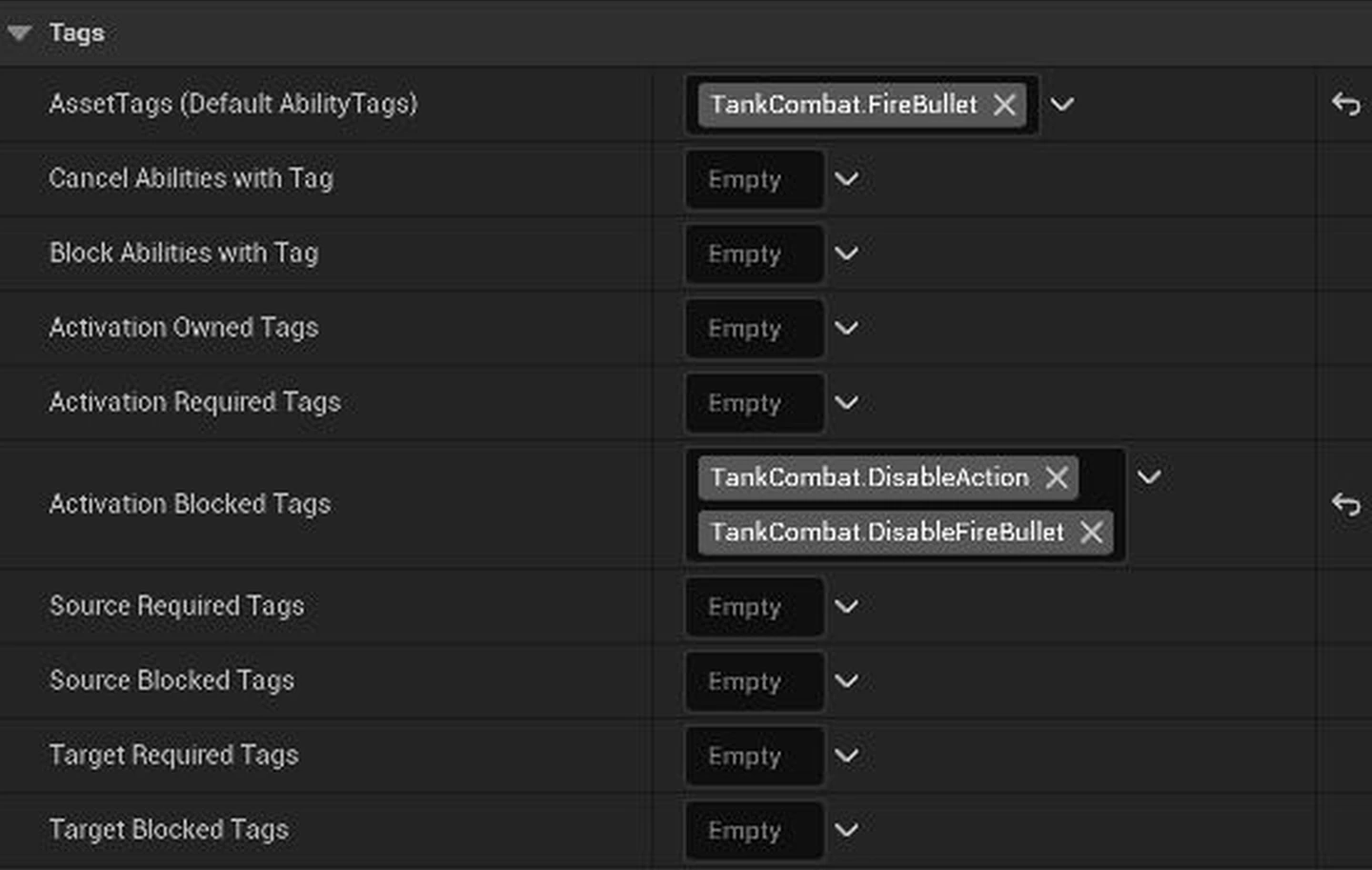
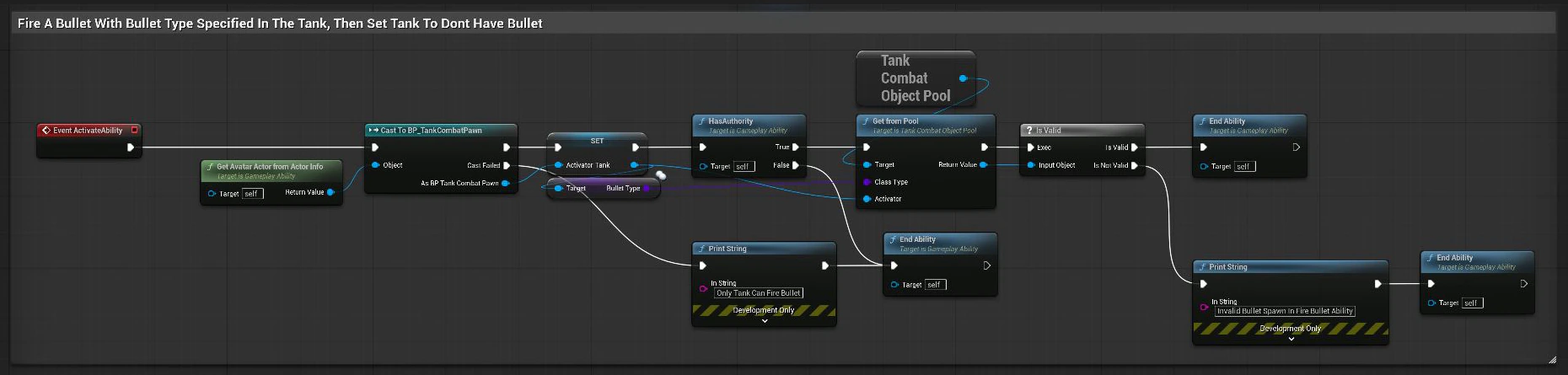
GA_FireBullet is blocked while the tank owns TankCombat.DisableFireBullet. With authority, it takes a bullet of the tank's type from the pool.
Activation
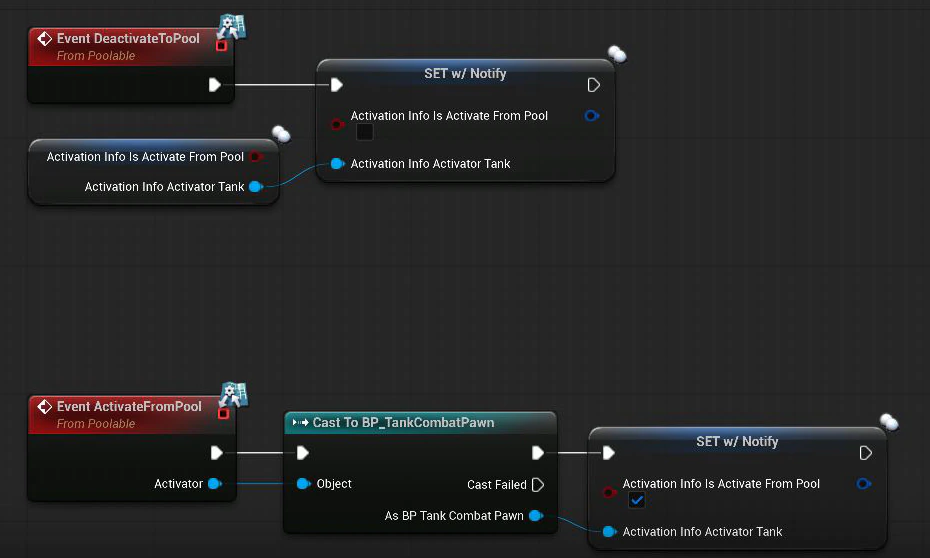
The pool calls ActivateFromPool. The bullet stores who fired it in a RepNotify struct, and OnRep_ActivationInfo sets it up on every machine.
Lock
On the server, the bullet adds TankCombat.DisableFireBullet to its tank as a replicated loose tag. The tank can't fire again.
Release
A wall, a tank or an expired lifetime returns the bullet to the pool. The server removes the tag, and replication clears it on the client.
The Rule Lives in Data
Firing is a Gameplay Ability rather than a plain function call, so the rule is configuration instead of code. GA_FireBullet lists TankCombat.DisableFireBullet as an Activation Blocked Tag: while the tank owns that tag, the ability system refuses to activate it.
The ability only does work where it has authority. On the server it takes a bullet of the tank's current type from the pool and ends; anywhere else it ends without spawning anything.
A Server-Side Object Pool
Bullets are never spawned or destroyed mid-match. A UWorldSubsystem pre-spawns each game mode's bullets on the server when the match starts, marks them replicated and parks them until they're needed.
Anything poolable implements IPoolable, a C++ interface whose events are implemented in Blueprint. The pool drives Blueprint bullets through that interface without depending on their classes, and every entry point checks that it is running on the server, so a client can never hand out or reclaim a bullet.
UINTERFACE(Blueprintable)class UPoolable : public UInterface{ GENERATED_BODY()}; class IPoolable{ GENERATED_BODY() public: UFUNCTION(BlueprintCallable, BlueprintNativeEvent) void ActivateFromPool(AActor* Activator); UFUNCTION(BlueprintCallable, BlueprintNativeEvent) void DeactivateToPool();};AActor* UTankCombatObjectPool::GetFromPool( TSubclassOf<AActor> ClassType, AActor* Activator){ // Only the server should hand out actors from the pool if (!IsServerSide()) return nullptr; AActor* FoundActor = nullptr; if (Pool.Contains(ClassType) && ClassType->ImplementsInterface(UPoolable::StaticClass())) { if (Pool[ClassType].Num() > 0) { FoundActor = Pool[ClassType].Pop(true); IPoolable::Execute_ActivateFromPool(FoundActor, Activator); } } return FoundActor;} bool UTankCombatObjectPool::IsServerSide() const{ UWorld* World = GetWorld(); if (!World) return false; return World->GetNetMode() != NM_Client;}Activation Is State, Not an Event
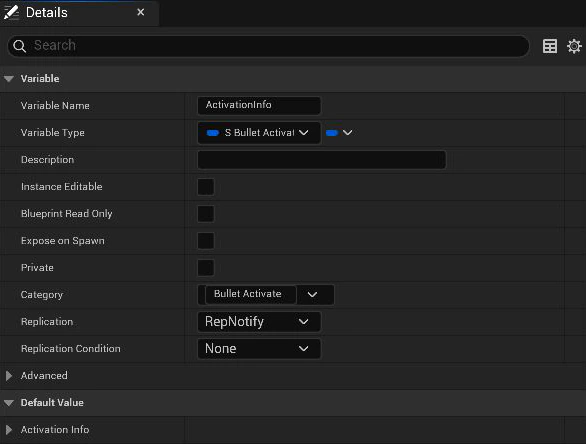
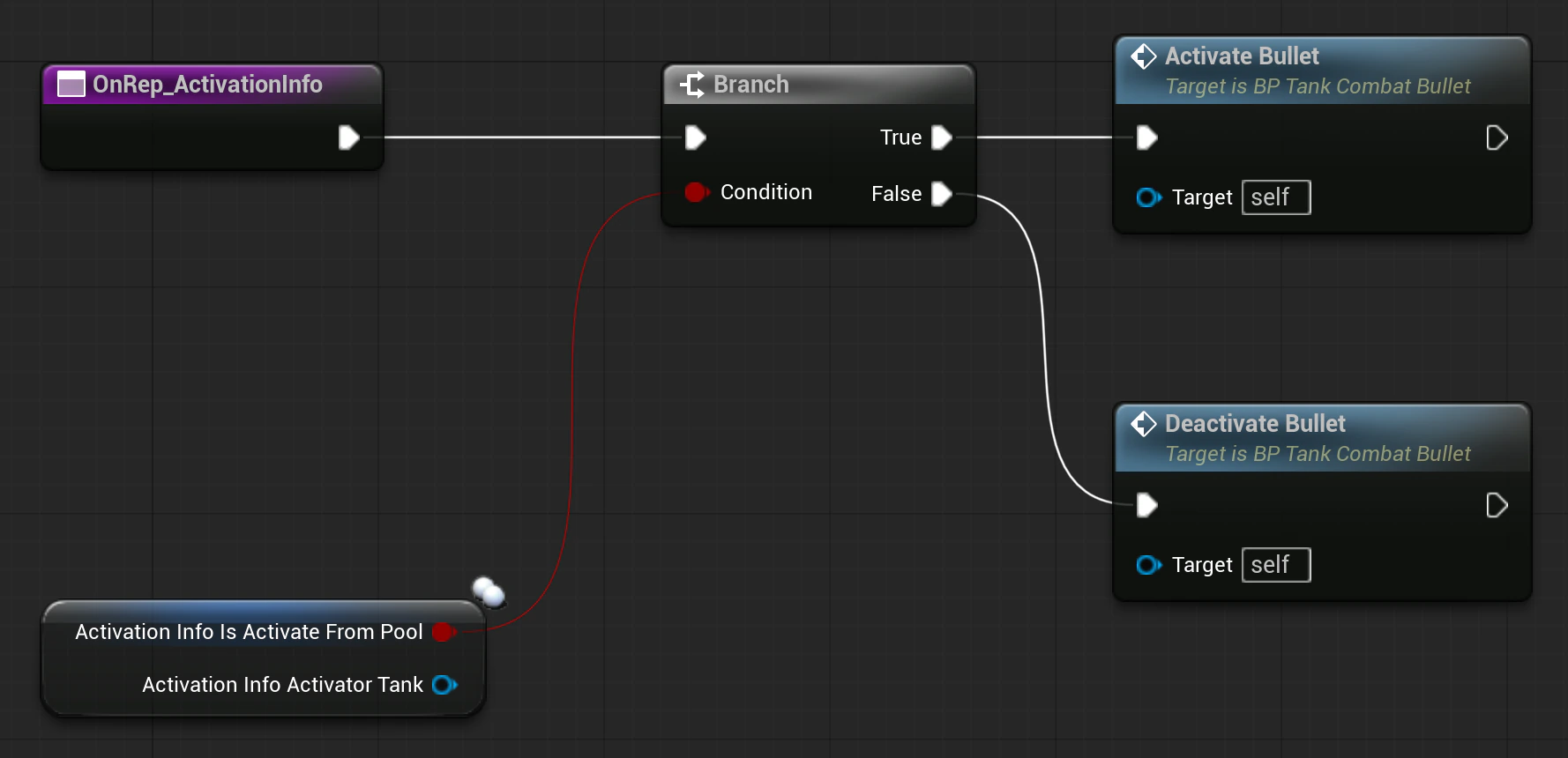
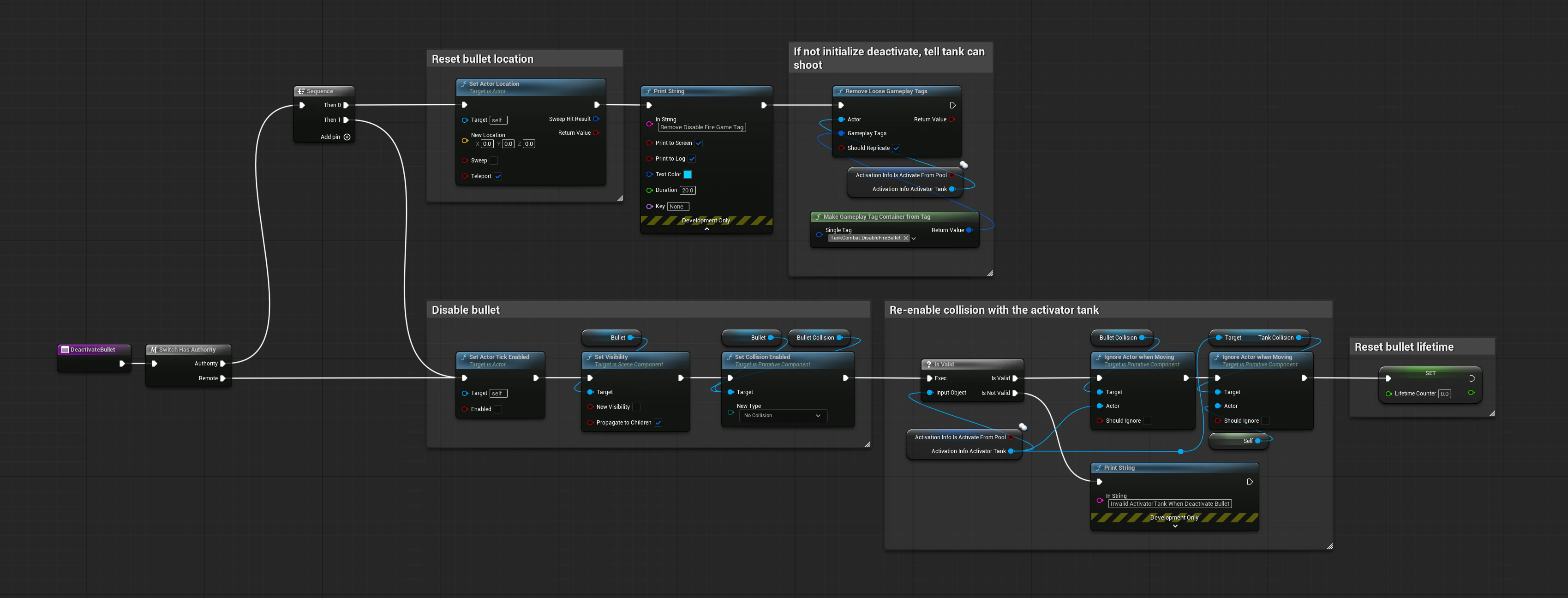
The pool's events don't set the bullet up directly. They write an ActivationInfo struct, holding whether the bullet is live and which tank fired it, into a RepNotify variable. OnRep_ActivationInfo runs on the server when the value is set and on the client when it arrives, then routes to ActivateBullet or DeactivateBullet.
Inside those functions, Switch Has Authority splits the work. The server positions the bullet and adds or removes the fire-lock tag; every machine updates the bullet's visibility and collision. The tag is a loose gameplay tag added with Should Replicate, so the client's copy of the tank carries the same lock as the server's.
Speed Boost
The pickup is the attribute side of GAS: a timed Gameplay Effect changing replicated attributes.
The Effect
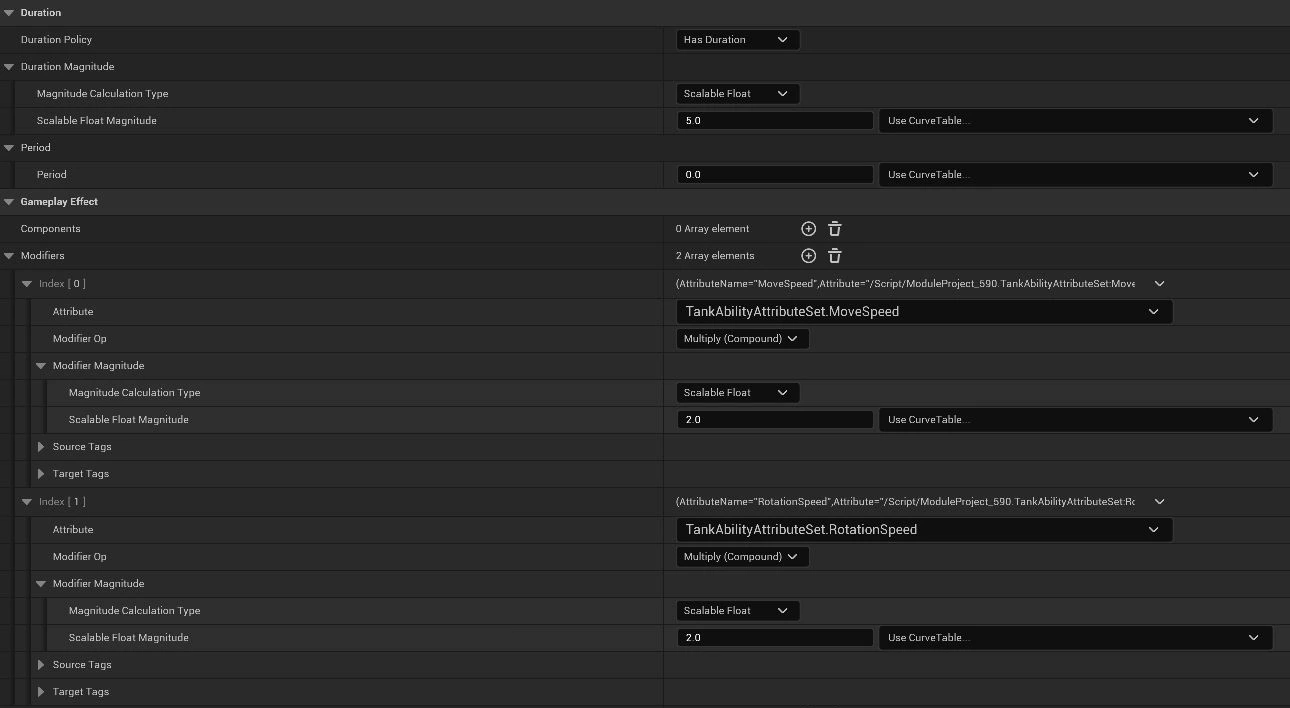
GE_BoostSpeed has a five-second duration and two Multiply (Compound) ×2 modifiers, one on MoveSpeed and one on RotationSpeed. When it expires, GAS removes the modifiers and the attributes fall back to their base values, with no timer code of my own.
Rotating the box-shaped tank on the edge of the pickup's trigger kept re-entering the overlap and stacking the effect. A short cooldown on the pickup fixed it.
The Attributes
Attribute sets can only be declared in C++. MoveSpeed and RotationSpeed replicate with REPNOTIFY_Always, so the client's values follow the server's.
The pawn subscribes to MoveSpeed changes in C++ and re-broadcasts them through a BlueprintAssignable delegate, so the Blueprint movement code reacts to the new speed without polling.
void ATankCombatPawn::BeginPlay(){ Super::BeginPlay(); // Ask GAS to find the Ability System Component on this Actor UAbilitySystemComponent* ASC = UAbilitySystemGlobals::GetAbilitySystemComponentFromActor(this); if (ASC) { ASC->GetGameplayAttributeValueChangeDelegate( UTankAbilityAttributeSet::GetMoveSpeedAttribute() ).AddUObject(this, &ATankCombatPawn::HandleMoveSpeedChanged); }} void ATankCombatPawn::HandleMoveSpeedChanged( const FOnAttributeChangeData& Data){ // Broadcast the new value to your Blueprint Event Graph OnMoveSpeedChanged.Broadcast(Data.NewValue);}void UTankAbilityAttributeSet::GetLifetimeReplicatedProps( TArray<FLifetimeProperty>& OutLifetimeProps) const{ Super::GetLifetimeReplicatedProps(OutLifetimeProps); // REPNOTIFY_Always ensures the client updates even if it // tries to predict the value locally DOREPLIFETIME_CONDITION_NOTIFY(UTankAbilityAttributeSet, MoveSpeed, COND_None, REPNOTIFY_Always); DOREPLIFETIME_CONDITION_NOTIFY(UTankAbilityAttributeSet, RotationSpeed, COND_None, REPNOTIFY_Always);} // Fires on the client when the Server sends a new MoveSpeedvoid UTankAbilityAttributeSet::OnRep_MoveSpeed( const FGameplayAttributeData& OldMoveSpeed){ GAMEPLAYATTRIBUTE_REPNOTIFY( UTankAbilityAttributeSet, MoveSpeed, OldMoveSpeed);}Bullet Types
Each game mode decides which bullet class the tanks fire and how many the pool pre-spawns. All three share the same pooled, replicated lifecycle.
Standard
Flies straight from the tank's fire pivot and returns to the pool when it hits a wall or a tank, or when its lifetime runs out.
Guided
Every tick, its velocity is overwritten with the firing tank's current facing, so the player steers the shot by turning.
Bouncing
Reflects off walls instead of returning to the pool, using a C++ helper that mirrors the velocity across the hit normal.
Results and Takeaways
Project Outcome
A packaged build that two machines on the same network can host and join, with all three bullet modes and the speed-boost pickup.
Watch the full gameplay video →What I Took Away
Relevancy Follows the Viewer
Hold Input as State
Replicate State, Not Moments
Future Improvements
Lighter Network Traffic
Client-Side Prediction
Credits
Built for a game development course at Duke University. The arena ground and layout textures came with the course starter content and recreate the playfields of Atari's Combat (1977).